
Zora - Music Player
THREESIDE PEPTIDESMusic & Audio
4.66.00 Reviews
- Version
- 1.1.2
- Installs
- 10.00K
- Age Rating
- Everyone
Screenshots
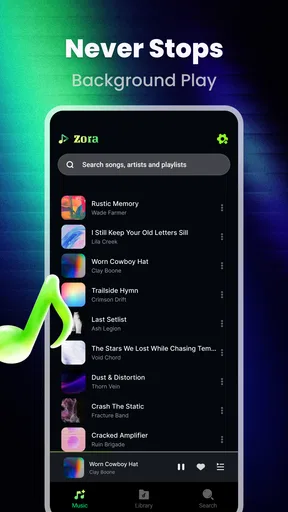
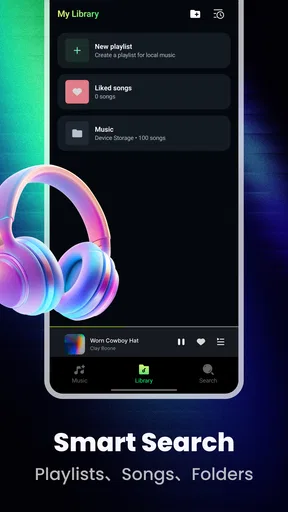
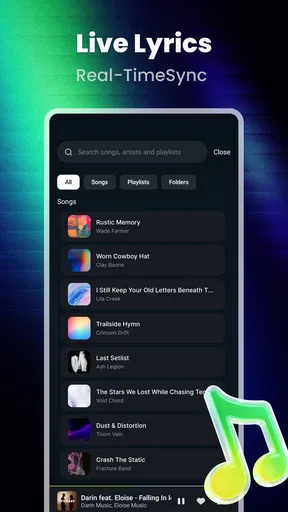
Our Review of Zora - Music Player
 Analysis by Appyee
I spent time with Zora - Music Player as a local music app, and my first impression was clear: it is aimed at listeners who already have music files and want a focused way to play them. That distinction matters. This is not a review of a streaming catalog, a radio service, or a social music platform. Zora sits in the more personal side of Music & Audio, where the quality of the experience depends on how well the player handles the collection you already keep on your device.
Created by THREESIDE PEPTIDES, the app is free to use and carries an Everyone age rating. Its current version is 1.1.2, and it runs on Android 8.0 or later. Those details make it accessible to people using older compatible phones, while the free price removes the biggest barrier to trying it. I would still approach it with the right expectations: the appeal is ownership and control of local music, not access to a huge online library.
How Zora fits into everyday music listening
The strongest reason to consider Zora is its simple premise. If your music is stored locally, a dedicated player can feel more direct than opening a streaming app and searching through recommendations, subscriptions, playlists, and online albums. I found the local-player approach especially appealing when I already knew what I wanted to hear. There is less temptation to browse endlessly, and the listening session begins with the files I chose to keep.
That makes the app a natural match for downloaded albums, personal recordings, legally acquired tracks, and music copied from another device. It can also suit someone who prefers to maintain a collection independently of a streaming service. If a particular album disappears from a catalog, changes availability, or becomes tied to a different subscription tier, a local library gives the listener more continuity. Zora’s role is to make that personal collection useful on a phone.
The store summary describes it as a powerful local music player for people who truly own their music. In practice, I read that as a promise about listening philosophy rather than a claim that it replaces every feature of a streaming platform. The app is most convincing when I treat it as a private shelf for music I already possess, not as a discovery engine.
What the free price really means
There is an important value advantage here: Zora is free. That means I can test its approach without committing money first, and someone moving away from a paid streaming plan can explore local playback without adding another cost. For a user with an existing collection, that is a meaningful benefit because the app’s basic purpose does not depend on buying access to a new catalog.
Free access should not be confused with unlimited streaming value. The app does not turn a phone into a subscription service, and I would not choose it if my main goal were instant access to unfamiliar artists, curated discovery, or a large online catalog. Its value comes from playing music I already have, so the quality of the experience depends partly on the organization and completeness of my own files.
That distinction also makes the cost question refreshingly straightforward. I can install it and judge the workflow directly rather than calculating whether another monthly plan is worthwhile. The practical trade-off is that I may need to spend time preparing my library elsewhere. The app saves subscription expense, but it does not remove the work involved in obtaining, transferring, naming, and maintaining local music.
Getting more from a personal library
One useful way to approach Zora is to treat the phone as the final stage of a library workflow. Before opening the player, I would make sure album folders are sensibly arranged, track names are readable, and cover art and metadata are as consistent as possible. That preparation is not glamorous, but it can make a bigger difference than switching between several players. A local app can only present the information that exists in the files it reads.
For a daily commute, I would prepare a small group of albums rather than rely on endless discovery. That creates a calmer routine: choose a record before leaving, start playback, and keep the phone focused on listening. For travel, local files are also useful because the music is not dependent on a live connection. I would still check the collection before leaving, since a player cannot help if the desired album was never transferred to the device.
Another practical use is keeping a separate listening space for music that does not fit neatly into a streaming account. Personal mixes, older recordings, independent releases, and files gathered over time can live beside regular albums. This is where a local player feels more flexible than a service built around its own catalog. I can decide what belongs in the library instead of waiting for a platform to support it.
There is also a useful ownership habit hidden in this setup: keeping a backup. Zora can make local music convenient, but the phone should not be the only place where important files exist. I would maintain the original collection on a computer or external storage, then copy selected music to the phone. That approach protects the library while keeping the mobile player uncluttered.
Where it differs from streaming apps
Compared with a typical streaming app, Zora begins with a smaller but more personal universe. Streaming services are better when I want to search for an artist I have never heard, follow editorial playlists, receive recommendations, or move between devices through an online account. They are designed around breadth and discovery. Zora is better when the music is already mine and I want playback without the extra layers.
The difference is also noticeable in how I make decisions. A streaming app encourages me to ask, “What should I listen to next?” A local player encourages me to ask, “Which part of my collection fits this moment?” Neither approach is universally better. The first is exciting when I want variety; the second is satisfying when I want familiarity, focus, or independence from a catalog.
Compared with a basic phone music application, Zora’s appeal is its dedicated identity as a local player. I would choose it when the default player feels too tied to the phone’s broader media behavior or when I want a separate place for my owned music. However, people who are already happy with their phone’s built-in playback may not notice enough difference to justify changing habits. The free price makes testing easy, but convenience still matters.
Small workflow choices that improve the experience
I found three decisions especially useful when thinking about this kind of app. First, I would keep the phone library selective instead of copying every file I own. A smaller collection is easier to browse and makes albums feel intentional. Second, I would use clear folder and file naming before importing music, because confusing labels can make even a capable player feel disorganized. Third, I would create a repeatable transfer routine so new music does not become scattered across random folders.
Those are not flashy features, but they are the kind of details that determine whether local playback remains pleasant after the initial installation. Zora’s central strength is connected to the user’s habits. Someone willing to maintain a collection can get a focused listening tool; someone who dislikes file management may experience the same design as extra work.
I would also separate “music I want available everywhere” from “music I am archiving.” The phone is best used for the first group. Keeping everything on the device can make selection harder and consume storage, while a carefully chosen mobile library stays easier to navigate. This is a trade-off I would accept for regular listening, especially when I want albums ready without depending on a service account.
Limitations worth considering before switching
The biggest limitation is inherent in the local model: Zora cannot substitute for music access. If I do not already have the tracks, the app does not solve that problem. A streaming alternative is more convenient for building a new listening habit from scratch, while Zora becomes more valuable after the collection already exists.
There is also a maintenance cost. Files may have inconsistent metadata, duplicate tracks, missing artwork, or album names that do not match. Even if playback itself is smooth, the library can feel messy when its underlying files are messy. I would not blame the player for every organizational problem, but I would factor this work into the decision. The free installation does not mean the overall setup requires no effort.
Another trade-off is discovery. A local collection can be wonderfully focused, but it may also become repetitive. Streaming services invest heavily in suggestions and catalog exploration, whereas a personal player reflects the boundaries of what I have saved. If I rely on music to introduce me to new artists every day, I would keep a streaming service in my routine rather than expect Zora to provide that role.
Device changes require thought as well. A subscription account can make a library feel available after signing in on another device, while local music usually needs to be transferred again. For someone who regularly replaces phones or listens across several devices, that extra step may outweigh the benefits of ownership. For someone who mainly listens on one Android phone, it may be a minor inconvenience.
Who is most likely to appreciate it
Zora is a strong candidate for listeners who have deliberately built a local collection and want a clean way to use it on Android. It also makes sense for people who prefer albums over algorithmic playlists, want to reduce dependence on subscriptions, or keep music that is not available through mainstream catalogs. The Everyone rating and support for Android 8.0 or later also make it approachable for a broad range of compatible users.
I would especially recommend trying it if you have recently copied music from a computer to your phone and found yourself without a satisfying dedicated player. The app gives that collection a clear purpose. It can also work well for long trips, offline listening, personal archives, and listeners who want their music choices to remain separate from online recommendations.
The audience is not limited to technical enthusiasts, but patience helps. If organizing files sounds frustrating, the app may feel less convenient than a service where albums and playlists are already prepared. Likewise, people whose listening is mostly about discovering new releases, sharing playlists, or moving seamlessly between devices may get more value from a conventional streaming platform.
What the early reception suggests
Zora has reached over ten thousand installs and holds a 4.6 average from around one hundred seventy ratings. That gives me a useful signal: the app has attracted a real group of users and the overall response is positive. At the same time, I would treat that reception as encouraging rather than conclusive. A local player can satisfy a focused audience very well, but different users may judge it according to very different library habits.
The app has also received six written reviews, which is enough to show that people are engaging with it but not enough for me to treat every edge case as thoroughly represented. I would still test it with my own collection, particularly if metadata organization, transfer habits, or device compatibility are important to me. The free price makes that personal trial much easier.
THREESIDE PEPTIDES has positioned the app around a clear idea instead of trying to make it sound like every kind of music product at once. That focus is valuable. I would rather use a tool that understands its audience than install a general music app and discover that local files are treated as an afterthought.
My recommendation after using the local-player approach
My recommendation is positive, but it is conditional. I would suggest Zora to a friend who owns music files and wants a free, dedicated Android player without turning the listening experience into another subscription decision. The app’s value is strongest when I already have albums ready and want a straightforward path from personal collection to daily playback.
I would skip it as my main music app if I expected one installation to provide a large catalog, constant recommendations, collaborative playlists, or effortless access across multiple devices. In that situation, a streaming service is the better tool, even if it costs money, because it matches the actual need. Choosing Zora for that job would create disappointment rather than save money.
For everyone in between, the sensible approach is to try it with a small, well-organized selection. Copy a few favorite albums, check whether the browsing experience fits your habits, and use it during a normal day rather than judging it only from the installation screen. That test reveals the real trade-off quickly: local ownership gives control and independence, but it asks me to take responsibility for the library.
Overall, I see Zora as a focused and worthwhile free option for people who want their phone to respect the music they already own. Its best feature is not a promise of endless content; it is the freedom to listen from a collection built on my terms. If your music is already yours, Zora gives that library a practical place to live. If your priority is discovery and instant access to everything, I would choose a different category of app instead.
Verdict
Strengths of Zora - Music Player
- Clean, distraction-free interface makes browsing your library quick.
- Supports background playback while using other apps or locking the screen.
- Fast search helps locate artists, albums, and tracks with minimal effort.
- Playback controls are easy to reach from the notification panel.
- Lightweight design uses fewer resources than many feature-heavy players.
Limitations of Zora - Music Player
- May lack advanced audio tools such as an equalizer or detailed sound profiles.
- Compatibility can vary with unusual audio formats or poorly tagged files.
- Library organization may feel limited for users with very large collections.
- Some features may depend on the device’s media storage permissions.
- No built-in streaming catalog if you expect access to online music services.
Similar Picks in This Category
View All
YouTube Music
Google LLC4.4

Samsung Music
Samsung Electronics Co., Ltd.3.8

Spotify: Music and Podcasts
Spotify AB4.3

JioSaavn - Music & Podcasts
Saavn Media Limited4.3

Lark Player:Music Player & MP3
Lark Player Studio - Music, MP3 & Video Player4.6

StarMaker: Sing Karaoke Songs
SKYWORK AI PTE. LTD.4.3
Frequently Asked Questions
What is Zora - Music Player, and what can it do?
Zora - Music Player is designed for listening to music stored on your device, offering a straightforward way to browse tracks, organize albums or artists, and control playback. Depending on the version and platform, it may include features such as playlists, shuffle and repeat modes, background playback, a queue, favorites, and customizable playback settings. Its main appeal is local music playback without the complexity of a full streaming service.
Does Zora - Music Player require an internet connection or a subscription?
For playing music files already saved on your phone, Zora - Music Player generally does not need a continuous internet connection. This makes it useful for offline listening, traveling, or avoiding mobile data usage. However, some optional functions may depend on connectivity, and availability can vary by version. Users should also check the current store listing to confirm whether the app contains subscriptions, advertising, or paid upgrades.
Which audio files and devices are supported by Zora - Music Player?
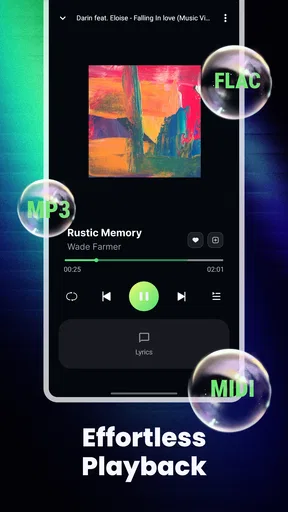
Compatibility depends on the operating system version and the specific release of Zora - Music Player. Most music players support common formats such as MP3, AAC, WAV, and FLAC, but less common or protected files may not play correctly. Before downloading, check the app’s store description and permissions, then confirm that it supports your phone, tablet, Android or iOS version, and preferred audio formats.
How does Zora - Music Player handle playlists, folders, and music organization?
Zora - Music Player is most useful when your music library is properly tagged or arranged on the device. The app may organize songs using metadata such as artist, album, genre, and track name, while playlist tools can help group music for workouts, travel, or relaxing. If your library contains missing artwork or inconsistent tags, some sorting results may look untidy until the files are corrected.
Is Zora - Music Player safe to install, and what permissions should I expect?
As with any music application, download Zora - Music Player from the official Google Play Store or Apple App Store rather than an unofficial APK or third-party website. A local player normally needs access to music or media files so it can scan and play your library. Review the requested permissions, privacy policy, developer information, update history, and user reviews before installation, especially if the app requests access unrelated to audio playback.
